 Trusted Since 2001





Quick Summary
Key points
- An office door lock is a lockset with the office or entrance function. An inside push button locks the outside lever, and a key from outside or a turn of the inside lever unlocks it. The inside lever is always free.
- For cylindrical locks this is the ANSI F82 function. Common Schlage examples are the ND50 cylindrical entrance and office lock and the L9050 mortise entrance and office lock.
- It suits private offices where the occupant controls the lock. For rooms that must always stay locked, such as storage, a storeroom function is safer, because an office lock is open whenever the button is not pushed.
- Options include inside occupancy indicators, a deadbolt version in mortise locks, and conventional, full size or small format cores.
- Many failed office locks can be repaired on the door with a chassis kit or lock case, and some classroom locks can even be converted to the office function with a kit.
| Feature | Office or entrance function |
|---|---|
| Inside control | Push button locks the outside lever |
| How it unlocks | Key from outside, or turning the inside lever |
| Inside lever | Always free for exit |
| ANSI function | F82 for cylindrical locks |
| Schlage examples | ND50 cylindrical, L9050 mortise |
In This Guide
- What Is an Office Door Lock?
- How Does the Office Function Work?
- When Should You Use Storeroom or Classroom Instead of an Office Lock?
- Where Should You Use an Office Door Lock?
- What Options Are Available on Office Locks?
- Can You Repair or Convert an Office Lock?
- How Do You Install or Replace an Office Lock?
- What Goes Wrong With Office Locks?
- What Should You Confirm Before Ordering an Office Door Lock?
- About the Author
An office door has two jobs that pull in different directions. The person inside wants to lock it quickly without hunting for a key, and leave without thinking about it. The building wants the door secure when the office is empty, but openable by staff with a key.
The office function is built for exactly that balance. This guide explains how an office lock works, where it fits and where it does not, which options and series are common, and what to check when one needs replacing.
What Is an Office Door Lock?
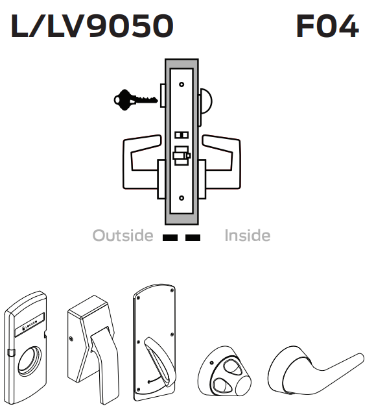
An office door lock is a commercial lockset with the office or entrance function. Both levers retract the latch until the outside lever is locked by the push button on the inside. Turning the inside lever, or using the key from outside, releases the button and restores free operation. The inside lever is always free, so nobody can be locked in.
In ANSI terms, this is the F82 function for cylindrical locks. Schlage sells it as the ND50 entrance and office lock in the ND Series and the L9050 entrance and office lock in the L Series.
Is an office lock the same as an entrance lock?
They are closely related and often sold as one function, entrance and office. Some series also have a separate entrance function. In the Schlage ND Series, for example, the ND53 entrance lock uses a turn and push button, while the ND50 is the entrance and office lock with a push button.
How Does the Office Function Work?
The office function has three states, and knowing them prevents most complaints.
- Unlocked. The push button is out. Both levers open the door.
- Locked. The occupant pushes the button. The outside lever is locked, and the inside lever still opens the door.
- Released. The occupant leaves by turning the inside lever, which pops the button and unlocks the outside, or staff unlock it from outside with a key.
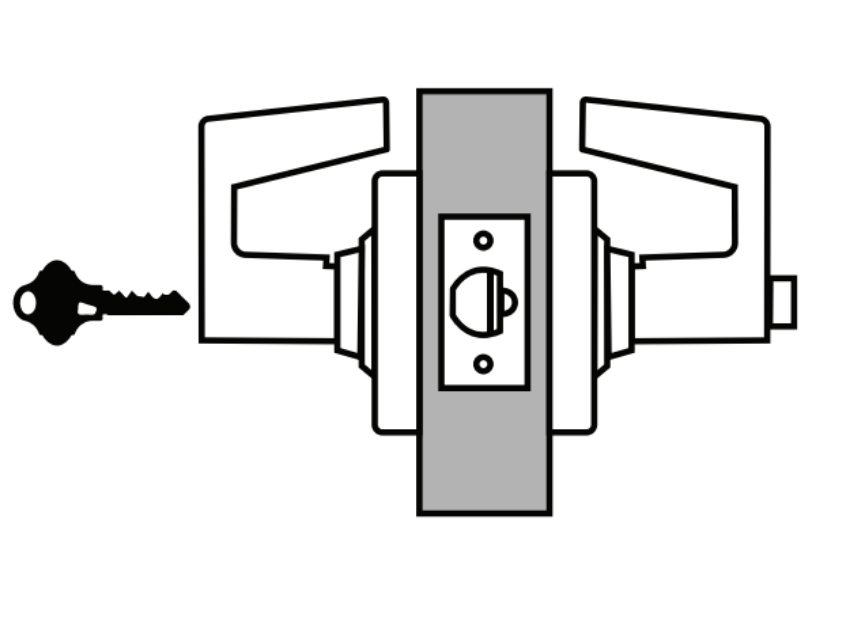
That last step is the important one. On many office locks, simply turning the inside lever to walk out releases the button, so the door is unlocked behind the occupant. To leave an office locked, the occupant needs the key, or the door needs a different function.
When Should You Use Storeroom or Classroom Instead of an Office Lock?
Whenever the room must stay secure without relying on the occupant. An office lock is unlocked any time the push button is not engaged, so a room left without the button pushed is open to anyone.
| Function | How the outside is locked | Unlocked state possible? | Best for |
|---|---|---|---|
| Office or entrance (F82) | Inside push button | Yes, whenever the button is out | Private offices the occupant controls |
| Classroom (F84) | Key from outside only | Yes, when set by a key holder | Classrooms and meeting rooms |
| Storeroom (F86) | Always locked outside | No | Storage, IT, pharmacy and mechanical rooms |
Specifying an office lock on a secure storage room is one of the most common lock function mistakes, because the room is only secure when someone remembers the button. Our Schlage ND80 storeroom lock guide explains the storeroom alternative, and our commercial lock function codes guide compares every function.
Where Should You Use an Office Door Lock?
Use it on doors where the person inside should control the lock.
- Private offices where the occupant locks the door for privacy or while away briefly.
- Consulting and interview rooms that need to be locked from inside during use.
- Small staff rooms and suites used by a known group who carry keys.
- Entrance doors to small tenant spaces, where the entrance function suits the way the space is opened and closed.
Avoid it on doors that must always be secure, doors where staff must always have access regardless of the occupant, and classrooms where the lock should be controlled by a key holder rather than whoever is in the room.
What Options Are Available on Office Locks?
Occupancy indicators
Some office locks show whether the room is locked. The Schlage ND50 is offered as an entrance and office lock with an inside indicator, and an indicator upgrade kit is listed for the ND53. Indicators help in shared offices and healthcare settings where people need to know a room's status at a glance.
Deadbolt versions
Mortise locks can combine the office function with a deadbolt in the same case. The Schlage L9453, for example, is an entrance and office lock with deadbolt, for doors that need a bolt as well as a latch. Our one sided deadbolt guide explains what it is and when to use one.
Cylinder and core options
Office locks are keyed, so the cylinder has to match the building's key system. The ND50 parts diagram, for example, lists conventional key in lever cylinders, full size interchangeable cores, a universal small format core driver and spacer, and tailpieces for several other manufacturers' cylinders. Confirm which one your doors use before ordering.
Electronic office locks
Where staff should enter with a credential instead of a key, an electronic or wireless office lock replaces the key with a reader or keypad. The Schlage NDE Series is one example, and replacement keypads and components are listed in our electronic lock keypads section.
Can You Repair or Convert an Office Lock?
Usually, yes, without removing the lock from the door.
- Chassis kit. When the latch stops retracting or the push button mechanism strips on an ND50 or ND53, the Schlage S00031721097 chassis kit replaces the internal mechanism. It ships unassembled with no rose, lever, escutcheon or strike, so the existing trim stays.
- Lock case. On the L Series, the Schlage L283-133 lock case covers the L9050 along with the L9056, L9060, L9066, L9070 and L9071. It ships right hand and is field reversible. Armor front, strikes, screws and cylinder are ordered separately, and Vandlgard (LV) locks need a different case.
- Conversion kit. The Schlage 40-325 kit converts an installed ND70 or ND94 classroom lock to the ND50 office function on the door, without removing the chassis or the cylinder. Lever design and finish must be specified, for example 40-325 RHO 626.
Our Schlage L Series parts guide and cylindrical lock parts guide explain the rest of the components.
How Do You Install or Replace an Office Lock?
On an existing door, a like for like replacement uses the existing prep.
- Identify the lock from the chassis label or lock case: series, function, finish and handing.
- Confirm the backset, door thickness and cylinder type so the new lock and core suit the door and key system.
- Remove the old lock, keeping the cylinder or core if it will be reused.
- Fit the latch or lock case, then the chassis and trim, making sure the push button is on the inside.
- Test all three states: unlocked, locked by the button, and released by the inside lever and by the key.
What Goes Wrong With Office Locks?
- The door is unlocked when it should be locked. Often working as designed: the inside lever released the button when someone left. Use the key, or reconsider the function.
- The push button will not stay in. The push button mechanism in the chassis has worn or stripped. A chassis kit is the usual fix.
- The key will not unlock the outside lever. Check the cylinder or core and its tailpiece or driver before replacing the lock.
- The lever sags or will not return. A worn spring cage, not a failed lock.
- The latch drags. Strike alignment or a dropped door. Our strike plate guide covers the fix.
What Should You Confirm Before Ordering an Office Door Lock?
Seven details settle the order: the series, cylindrical or mortise, the function (office, entrance or office with deadbolt), the backset, the door thickness, the cylinder or core type, and the lever design and finish. For repairs, note whether you need a chassis kit, lock case, conversion kit or individual part.
Browse the Schlage ND50 entrance and office lock and Schlage L9050 entrance and office lock diagrams, or the wider cylindrical lock parts and mortise lock parts sections.
About the Author
Security Parts has supplied repair parts for commercial door hardware since 2001, covering Von Duprin, LCN, Schlage, Falcon, Detex and Adams Rite at the component level. Our diagram based lookup exists so a technician can confirm a part before ordering it. This guide was written by the Security Parts team from supplier documentation and the questions our customers bring us.
If you are not sure whether a door has an office, classroom or storeroom function, contact us with a photograph of both sides of the lock and the chassis label, and we will help you identify it.