 Trusted Since 2001





Part number 46929063 is the Schlage OEM 4AA Battery Holder Kit for the AD Series and CO Series electronic lock families. If your Schlage AD-200, AD-250, AD-400, or CO Series lock is showing a low battery warning, the batteries have failed completely, or the battery holder assembly itself has become damaged, this guide gives you everything you need: what the 46929063 kit includes, every compatible lock model, how to read the low battery indicators, the correct replacement process pulled directly from Schlage's official documentation, battery failure modes, maintenance intervals, and where to order the genuine OEM part.
Browse the Schlage 46929063 4AA Battery Holder Kit at SecurityParts.com. Same-day shipping on stocked quantities.
What Is Part Number 46929063
Part number 46929063 is the official Schlage OEM designation for the 4AA Battery Holder Kit used in compatible Schlage AD Series and CO Series electronic locks. It is Item 15 in the official Schlage AD Series Service Manual (document 106502) and is the correct factory-replacement interior battery assembly for these lock families.
This is not a generic or aftermarket component. It is a genuine Schlage part manufactured to the exact tolerances and connector specifications required for the AD and CO Series interior escutcheon. Using a non-OEM battery holder in a Grade 1 commercial electronic lock risks improper fit, unreliable electrical contact with the interior main board, and potential voiding of the lock warranty and UL listing compliance.
What the 46929063 Kit Includes
This kit ships with three components as listed in the official service manual:
- 4AA Battery Holder with Cable, the main plastic housing that holds four AA batteries and connects to the interior main board via an integrated cable harness with a factory connector
- 4AA Battery Strap, a securing strap that holds the battery holder firmly in place inside the interior escutcheon during door operation, vibration, and thermal cycling
- Battery Holder Screws (2), two screws used to mount and secure the strap and holder assembly to the interior escutcheon
Batteries are not included. The 46929063 requires four standard AA alkaline batteries, purchased separately. The official Schlage user guides for the AD-200, AD-250, and AD-400 specify alkaline batteries only. Do not use lithium or rechargeable NiMH batteries, the voltage profiles of these battery types cause irregular low-battery detection readings in the AD and CO Series lock electronics.
For ULC-S319 compliant installations, the official Schlage documentation specifies the following AA alkaline battery models: Duracell PC1500 or MN1500, Energizer E91, EN91, AX91, or XR91, and Rayovac 815 or 815-HE.
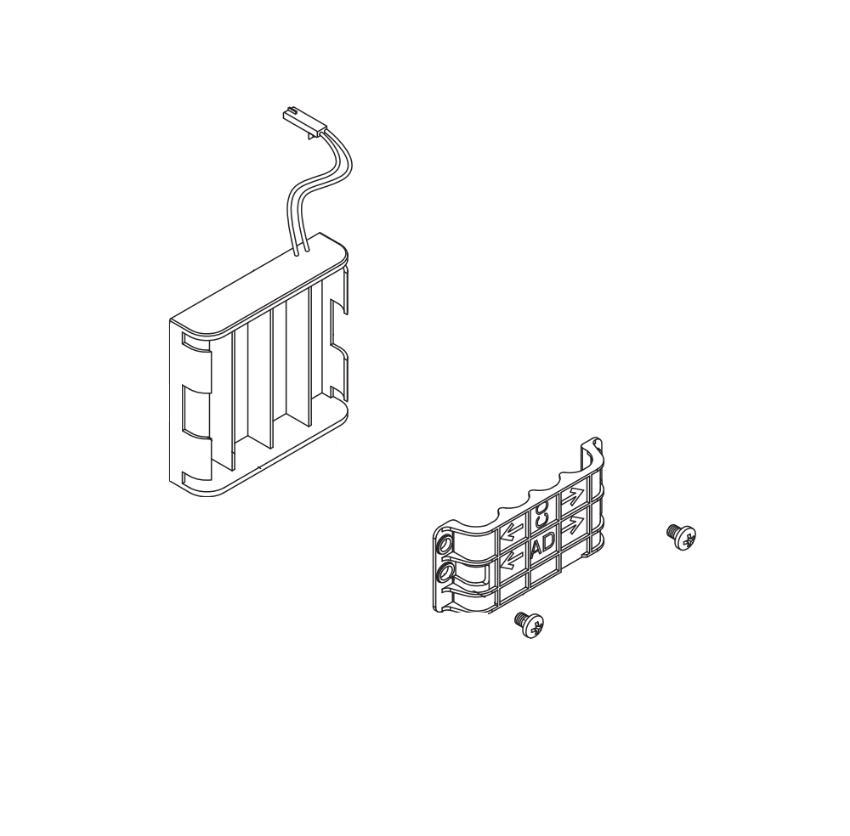
Schlage 46929063 4AA Battery Holder Kit. OEM replacement for Schlage AD and CO Series electronic locks. Includes battery holder with cable, battery strap, and two mounting screws. In stock at SecurityParts.com.
Schlage AD Series and CO Series Compatibility
The 46929063 fits both the 4AA battery configuration of the Schlage AD Series and compatible CO Series electronic locks. Verify your lock's battery configuration before ordering, not all AD and CO Series models use the 4AA layout. Some use an 8AA holder instead.
AD-200 and AD-250 Series Compatibility
This battery holder is used in the interior of the following AD-200 and AD-250 configurations, as confirmed in the Schlage AD Series Service Manual:
- AD-200/250 cylindrical locks, interior portion of the lock body
- AD-200/250 mortise locks, interior of the mortise lock assembly
- AD-200 mortise deadbolt, interior of the mortise deadbolt
- AD-200/250-993-R, S, M, exit trim configurations using the AD-200/250 interior assembly
AD-400 Series Compatibility
This kit is also used in the following AD-400 networked wireless lock configurations:
- AD-400 cylindrical locks, interior battery assembly
- AD-400-MS, mortise lock configuration
- AD-400-MD, mortise deadbolt configuration
- AD-400-993-R, S, M, exit trim configurations using the AD-400 interior
- AD-400-993 Series, 993 series networked variants
CO Series Compatibility
Compatible CO Series electronic locks use the same interior battery assembly platform as the AD Series, and 46929063 is listed in CO Series service documentation. Confirm your specific CO Series model against the official service manual before ordering to verify the 4AA battery configuration applies to your unit.
AD Series Technical Certifications
The Schlage AD Series locks that use this battery holder are certified to ANSI/BHMA A156.25 Grade 1, UL 294, UL 10C, FCC Part 15, ADA, and RoHS. Maintaining OEM battery holder components is part of preserving compliance with these certifications. The maximum current requirement for the AD Series is up to 250 mA, and the interior operating temperature range, where the 46929063 operates, is 32°F to 120°F (0°C to 49°C).
4AA vs 8AA: Confirming the Right Battery Holder for Your Lock
The AD Series and CO Series are available in two battery configurations. The 46929063 covers the 4AA configuration. The Schlage 46929097 is the separate 8AA battery holder kit for models that use eight AA batteries. These two kits are not interchangeable.
To identify which configuration your lock uses, remove the interior assembly and examine the existing battery holder. It will clearly show whether it holds four or eight batteries. You can also identify the configuration from your lock's model number suffix or by referencing the Schlage AD Series Service Manual against your specific function and trim code.
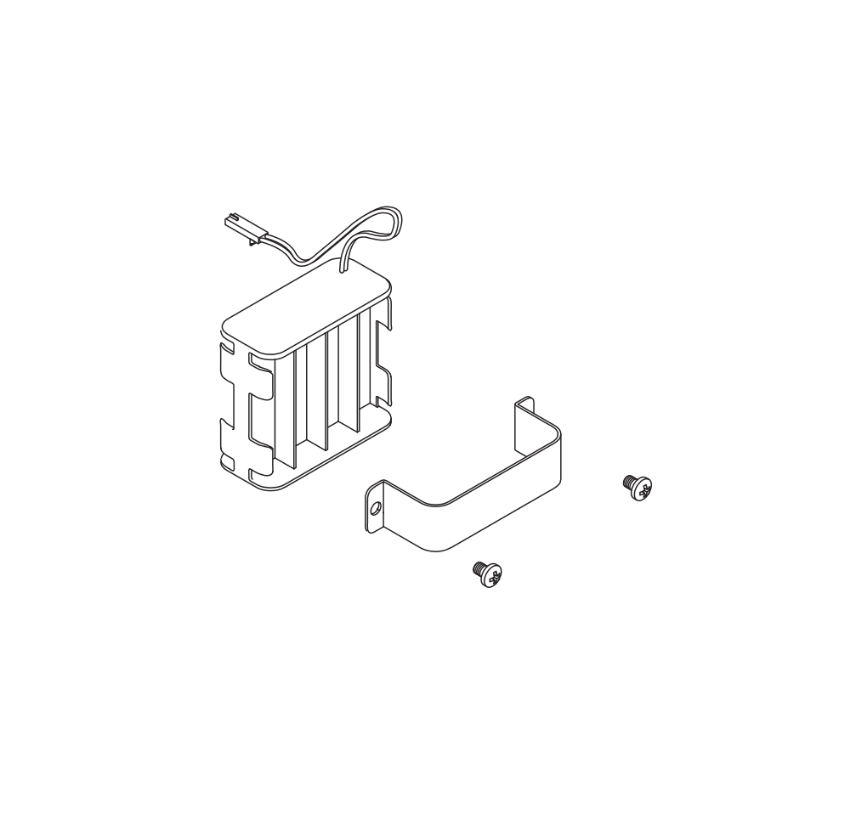
Schlage 46929097 8AA Battery Holder Kit, the 8AA alternative for AD and CO Series configurations that use eight batteries. Order 46929097 only if your lock uses eight AA batteries. Both kits stocked at SecurityParts.com.
How to Read the Low Battery Warning on Schlage AD Series Locks
One of the most important gaps in every current page ranking for 46929063 is the complete absence of low battery indicator guidance. The official Schlage AD-200 and AD-400 User Guides document this precisely. Understanding the warning signs allows facilities staff to order the 46929063 and replacement batteries before a complete power failure occurs.
AD-200 and AD-250 Low Battery Indicators
On the Schlage AD-200 and AD-250 offline locks, the low battery condition is indicated as follows, per the official Schlage AD-200 Offline Lock User Guide:
- Low battery warning (AA batteries): After a credential is presented, the left Schlage button produces 9 red blinks, then the normal access indicator follows
- Low battery warning (coin cell): After a credential is presented, the right Schlage button produces 9 red blinks
- Battery failure: No LED or beep response. Valid credentials do not grant access. The mechanical override key must be used to unlock the door until batteries are replaced
- Beeper behavior: During a low battery condition, the reader beeper is temporarily disabled. It returns to normal function once batteries are replaced
- Operating window after low battery warning: The lock is intended to operate for approximately 500 credential cycles in low battery condition before complete failure
Important: If your lock shows no LED and no beep, and valid credentials are not granting access, the batteries have likely reached complete failure, not just low battery. Replace the batteries immediately and use the mechanical override key for access in the interim.
AD-400 Networked Lock Low Battery Indicators
On the Schlage AD-400 networked wireless locks, the low battery behavior differs from the offline AD-200/250 series, per the official Schlage AD-400 User Guide:
- Low battery warning: Approximately one month before the end of battery life, the lock sends a Low Battery Trouble signal to the PIM400 access control panel, which in turn sends a Trouble signal to the access control system, typically generating an alert at the head-end software
- SUS communication failure in low battery: When a low battery condition is present, the lock may not have sufficient power to communicate with the Setup Utility Software (SUS). If the Schlage button lights solid red for one second when SUS communication is initiated, the battery level is too low to support communication, replace batteries immediately
- Battery failure: No LED or beep response. Valid credentials do not grant access. Mechanical override key required
Key difference: The AD-400's networked connection means the access control panel receives the battery alert automatically, approximately one month in advance. Facilities managing AD-400 locks through a central access control system should ensure the panel is configured to forward Low Battery Trouble signals to maintenance staff.
Battery Failure Modes: What Happens When the Battery Dies Completely
Both the AD-200/250 and AD-400 series allow the battery failure mode to be configured via the Setup Utility Software (SUS). The official Schlage documentation defines three modes:
- Fail As-Is (default): The lock remains in its current state, locked or unlocked, until batteries are replaced. This is the factory default for both series
- Fail Unlocked: The lock unlocks and remains unlocked until batteries are replaced. Use with caution on security-critical openings. Not available when the lock is externally powered
- Fail Locked: The lock locks and remains locked until batteries are replaced. Not available when the lock is externally powered
Knowing the configured failure mode for each AD or CO Series lock in your facility is essential for emergency planning. If a lock fails in an unexpected state, the first action is to use the mechanical override cylinder, not to assume the lock is defective.
For a broader understanding of how battery-powered electronic locks integrate with access control systems, see the access control and commercial door hardware integration guide.
Schlage 46929063 Battery Replacement: Step-by-Step Process
The following steps reflect the battery replacement procedure documented in the official Schlage AD-200, AD-250, and AD-400 User Guides. Always consult the official documentation for your specific model and configuration before beginning service work.
Tools and Materials Required
- Four fresh AA alkaline batteries (alkaline only, not lithium, not rechargeable)
- Phillips head screwdriver
- Torx T10 driver (required on some AD Series interior trim screws)
- Clean dry cloth
- Replacement Schlage 46929063 kit if the holder assembly itself needs replacement
Step 1: Present a Valid Credential First
Before removing the interior assembly, present a valid credential to confirm the lock is in a known operational state. This is particularly important if the batteries are in a low, but not failed, condition, as the lock should still respond. Knowing the current state prevents unexpected lockouts during servicing.
Step 2: Remove the Battery Cover
Remove the battery cover from the interior escutcheon. On most AD Series configurations, the cover is secured by a single screw. Keep the screw and cover together, they are not included in the 46929063 replacement kit. The battery cover is a separate part (Schlage part 4C for the 4AA cover).
Step 3: Remove the Battery Bracket
Remove the battery bracket (strap) by unscrewing the two securing screws. The official Schlage guidance specifies one critical precaution here: do not allow the battery pack to hang from the wires. Support the battery holder as you remove the strap to prevent stress on the cable connector at the interior main board.
Step 4: Disconnect the Cable Connector
With the bracket removed and the holder supported, locate the cable connector running from the battery holder to the interior main board. Press the connector release tab and pull the connector straight out from the board. Always pull on the connector body, not on the cable wires, pulling on the wires can damage the harness and create an intermittent connection that is difficult to diagnose later.
Step 5: Install Fresh Batteries or the Replacement Kit
If you are replacing only the batteries: remove the four AA batteries from the holder, note the polarity markings inside the holder, and install four fresh AA alkaline batteries with the correct orientation. Incorrect orientation is one of the most common causes of failed battery replacement, the lock will not power up if even one battery is reversed.
If you are installing a replacement battery holder kit: transfer four fresh AA alkaline batteries into the new holder using the correct polarity orientation, then proceed with reassembly using the new strap and screws from the kit.
Caution from official Schlage documentation: There is a danger of explosion if the battery is incorrectly replaced. Replace only with the same or equivalent type. Dispose of used batteries according to the manufacturer's instructions.
Step 6: Reconnect and Reinstall
Reconnect the battery cable to the interior main board connector until it clicks into place. Position the battery holder correctly inside the escutcheon, reinstall the battery strap over the holder, and tighten the two screws. Reinstall the battery cover, taking care not to pinch the battery wires between the cover and the escutcheon body when the cover is seated, the official Schlage guidance specifically warns against this, as pinched wires cause intermittent power faults that can be misdiagnosed as battery or main board failures.
Step 7: Test the Lock
Present a valid credential to verify the lock responds correctly. On the AD-200/250, expect a normal LED and audible indicator. On the AD-400, verify the lock communicates with the access control panel and no Low Battery Trouble signal is present. If the lock does not respond after battery replacement, the most common cause is the cable connector not being fully seated, disconnect and reconnect it before concluding the part has failed.
Note from Schlage's official documentation: Replacement of batteries does not affect any programmed data. Credential assignments, access schedules, and lock configuration are stored in non-volatile memory and are not lost during battery replacement.
Battery Maintenance for Schlage AD and CO Series Locks
Use Alkaline Batteries Only
Schlage specifies alkaline AA batteries exclusively for the AD and CO Series. The reason is voltage profile consistency: alkaline batteries maintain a more predictable discharge curve than lithium or NiMH alternatives. Lithium batteries operate at a slightly higher voltage that can skew the lock's battery level readings. Rechargeable NiMH batteries operate at 1.2V instead of the 1.5V of alkaline cells, which causes the lock's electronics to interpret them as partially discharged from the moment they are installed, triggering premature low battery warnings.
Replace All Four Batteries at the Same Time
Replace all four AA batteries in the 46929063 holder simultaneously. Mixing batteries of different ages, even partially used batteries from the same brand, causes uneven drain and shortens the effective service life of the new cells. A mismatched set also produces inconsistent voltage readings that can trigger false low battery conditions.
Establish a Preventive Maintenance Schedule
For high-traffic access control openings, check battery status every six months. For standard commercial openings with moderate credential traffic, annual replacement is a common starting interval. Adjust the schedule based on how frequently low battery warnings appear, repeated early warnings indicate higher-than-expected credential traffic or a temperature-related drain issue.
For facilities running AD-400 networked locks through a central access control panel, use the Low Battery Trouble signal as your scheduling trigger. The signal appears approximately one month before expected battery failure, enough lead time to schedule replacement without emergency urgency. For a complete preventive maintenance framework covering all commercial door hardware, see the commercial door hardware maintenance checklist.
Inspect the Holder Assembly During Every Battery Change
Every time batteries are replaced, briefly inspect the holder assembly for battery contact corrosion, cable connector damage, strap wear, or housing cracks. Catching early deterioration during a planned battery change costs a few minutes. An emergency holder replacement after complete lock failure can take a lock out of service for hours. If any damage is found, order a replacement 4AA Battery Holder Kit from SecurityParts.com for the next scheduled service visit.
Keep Spare Kits On-Site for Large Facilities
Facilities managing ten or more Schlage AD or CO Series locks benefit from keeping one or two spare battery holder kits on hand. When a holder assembly fails unexpectedly, an on-site spare allows same-day restoration without waiting for shipping. This practice is especially important for healthcare facilities, government buildings, and educational institutions where electronic lock downtime on a critical opening is not operationally acceptable.
Other Schlage AD and CO Series Parts at SecurityParts.com
SecurityParts.com stocks a complete range of OEM Schlage AD Series and CO Series service replacement parts. All part pages listed below are confirmed live at SecurityParts.com.
- Schlage 46929097, 8AA Battery Holder Kit, the 8AA configuration battery holder for AD and CO Series locks using eight AA batteries
- Schlage 46929048, Interior Main Board, the interior electronics assembly responsible for credential processing and lock control
- Schlage 46929121, Door Position Switch, the door status monitoring switch reporting open and closed status to the access control panel
- Schlage 46929139, REX Switch, Leaf Spring and Screws, the request-to-exit switch assembly for configurations requiring inside egress monitoring
- Schlage 46929303, Tailpiece Kit, tailpiece components for AD and CO Series mortise and cylindrical configurations
Browse the complete Schlage hardware parts range at the Schlage commercial hardware catalog. For guidance on OEM vs aftermarket parts for commercial electronic locks, see the OEM vs aftermarket commercial door hardware guide. For a broader look at Schlage cylindrical and electronic lock parts, see the cylindrical lock parts guide and the Schlage commercial lock parts guide.

Schlage commercial hardware parts at SecurityParts.com, OEM replacement parts for AD Series, CO Series, L-Series, ND Series, and ALX Series electronic and mechanical locks. In stock with same-day shipping.
Why Choose SecurityParts.com for Schlage 46929063
SecurityParts.com has stocked genuine OEM Schlage commercial hardware since 2001. Every part shipped is a factory-genuine replacement.
OEM Only, No Aftermarket Substitutes
Every kit stocked at SecurityParts.com is genuine Schlage OEM. Non-OEM battery holders may not fit precisely within the AD or CO Series interior escutcheon, may use lower-quality battery contacts that cause intermittent power connections, and may not include all three kit components. OEM compliance matters particularly for facilities operating under warranty, UL compliance requirements, or service contracts specifying genuine manufacturer parts.
Same-Day Shipping on Stocked Parts
This part is stocked and available for same-day shipping from US warehouses on stocked quantities. For time-sensitive lock service, same-day dispatch reduces the window a critical opening is without full electronic access control function.
Full AD and CO Series Parts Coverage
SecurityParts.com stocks the complete range of AD Series and CO Series service replacement parts from battery holders through main boards, REX switches, door position switches, tailpiece kits, and interior baseplate assemblies. A single order can cover all parts identified during a scheduled service visit. Browse the complete commercial door hardware parts catalog at SecurityParts.com.
Order the Schlage 46929063 4AA Battery Holder Kit at SecurityParts.com. For specification questions, call 845-935-0301 or visit the contact page.
About the Author
This guide is published by the commercial door hardware team at SecurityParts.com, a supplier of genuine OEM Schlage, Von Duprin, LCN, Falcon, and Detex parts since 2001. The technical information in this guide is drawn directly from the official Schlage AD Series Service Manual (document 106502), the Schlage AD-200 Offline Lock User Guide (document 102107), the Schlage AD-250 Offline Lock User Guide (document 102108), and the Schlage AD-400 and AD-402 Networked Wireless Lock User Guide (document 104387). For 46929063 availability and same-day shipping, call 845-935-0301 or visit SecurityParts.com.